Most people looking for a stream loop app want the same thing: a video, a mix or a sleep sound that plays live on their YouTube channel all day and all night, set up from the phone in their pocket. The catch is that most live streaming apps on a phone send the video from the phone itself. Lock the screen, lose signal or let the battery run down and the stream ends. This guide explains the difference, shows how to run a 24/7 loop from your phone with nothing installed, and answers the questions people ask most, including free plans and modded APKs.
What is a stream loop app?
A stream loop app takes a video you already have and broadcasts it as a live stream that starts again from the beginning every time it ends, so viewers see one unbroken broadcast with the LIVE badge and live chat. It's how lofi radios, rain and white noise channels, meditation streams and replays of church services stay live around the clock without anyone sitting in front of a camera.
To send that video to YouTube, the app needs your channel's stream key and YouTube's RTMP server URL. Where the app sends it from is what decides whether your loop lasts an hour or a month.
Does a stream loop app need my phone to stay on?
It depends on the kind of app. There are two kinds, and they behave very differently once you leave the stream running:
| Streams from your phone | Streams from the cloud | |
|---|---|---|
| Examples | The YouTube app's Go live, Larix Broadcaster, Streamlabs, PRISM Live Studio | LoopStream Live and other cloud loop services |
| Built for | Your camera or screen, live | A pre-recorded video or playlist on repeat |
| Phone has to stay on | Yes, awake and connected the whole time | No, only while you set it up |
| Battery and heat | Drains while you're live | None once the stream starts |
| Mobile data | The whole stream, every hour | Only the upload, or none with a Drive or Dropbox link |
| Runs 24/7 | Not realistically | Yes, with automatic reconnects |
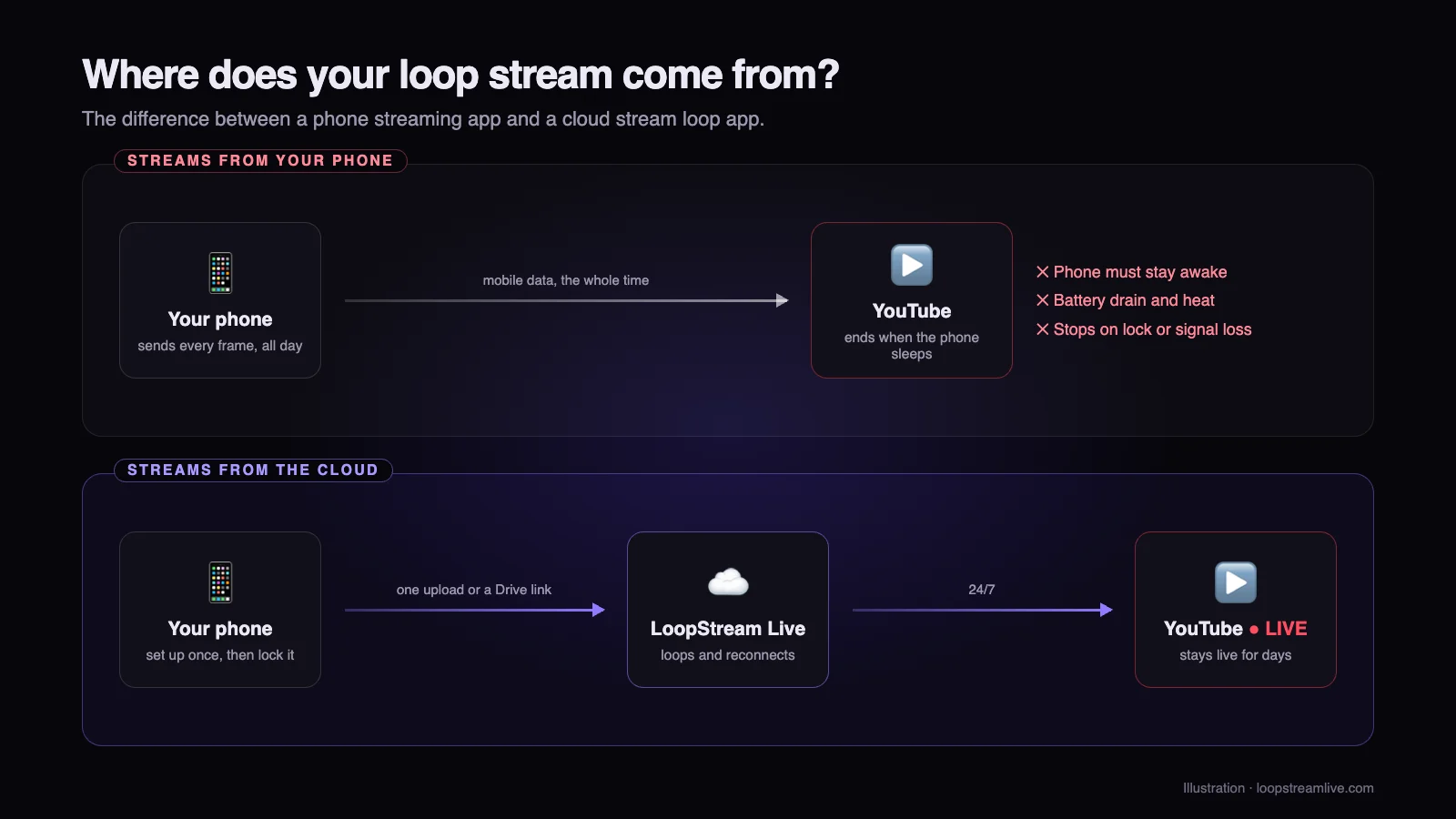
Phone streaming apps are great for what they're built for: going live with your camera or showing your screen. They're the wrong tool for a loop that should run for days, because a phone that streams around the clock overheats, needs to stay plugged in, and stops the moment Android or iOS puts the app to sleep. A cloud stream loop app moves the actual streaming to a server, and your phone becomes the remote control. If you'd rather use a computer, here's how to loop a video in OBS.
How to loop a video live 24/7 from your phone
LoopStream Live works in any phone browser, Chrome on Android and Safari on iPhone included, so there's no app to download. The whole setup takes a few minutes:
- 1
Open LoopStream Live in your browser
Go to loopstreamlive.com on your phone and sign in with your Google account. The free plan needs no card.
- 2
Add your video
Create a new stream and upload a video from your gallery, or paste a Google Drive or Dropbox share link so the file is copied to our servers without using your mobile data. Add more videos if you want a playlist. MP4 files with H.264 video and AAC audio work best.
- 3
Copy your YouTube stream key
Open studio.youtube.com in your phone's browser, switch to the desktop site, then go to Create, Go live and the Stream tab and copy the stream key. The YouTube apps don't show it, see how to find your stream key on a phone.
- 4
Paste the key and choose loop
Paste the key into your stream in LoopStream Live, pick YouTube as the destination and keep loop switched on, so the video starts again as soon as it ends.
- 5
Tap Go Live, then lock your phone
Your stream starts on our servers and appears on your channel within a minute. Check that it shows as live in YouTube Studio, then lock your phone, switch it off or close the browser. The loop keeps running.
What happens to the stream when my phone is off?
Nothing changes for your viewers. The video is already on our servers, which encode it and send it to YouTube with your stream key, start it again the moment it ends and keep going until you stop it. If YouTube drops the connection, which happens to every stream that runs for days, LoopStream Live reconnects on its own and resumes from the point the video had reached, rather than jumping back to 0:00.
You can open the dashboard on your phone any time to stop the stream, swap the video, or change the title of the loop. On a pass you can also schedule a YouTube live stream to start and stop at set times, once or every day.
Is there a free stream loop app?
Yes. LoopStream Live has a free plan you can use for as long as you like, with these limits:
| Free plan | With a pass | |
|---|---|---|
| Price | $0, no card | $5 a week, $12 a month or $120 a year (₹399, ₹999 or ₹9,999 in India) |
| Streaming time | 1 hour a day | 24/7, no daily limit |
| Quality | 720p | 1080p Full HD |
| Watermark | Small watermark | None |
| Streams live at once | 1 | 1 (weekly), 3 (monthly) or 5 (yearly) |
| Biggest upload | 2 GB per video | 4 to 10 GB per video |
Passes are a single payment with no subscription and no auto-renew, so nothing is charged again when the pass ends. To see how that compares, here are the best 24/7 live streaming services side by side. A sensible way to start: run the free plan for a day to check the video, the audio and the loop point on your own channel, then buy a week when you're ready to stay live around the clock.
Is a stream loop mod APK safe to use?
No. A modded APK is a paid app that someone has cracked and re-uploaded, and installing one means trusting an unknown person with the most sensitive thing a streamer has: the stream key. Anyone who has your key can broadcast to your channel, and a streaming violation can cost you your live streaming access or the channel itself. Mod APKs also skip Play Store checks, can carry malware, and break the first time the original app updates.
If what you're after is a free way to loop a stream, use a real free plan instead, like LoopStream Live's, which runs in your browser with nothing to install. If a stream key has ever been pasted into an app you don't trust, reset it in YouTube Studio: the Stream tab has a reset option, and the old key stops working straight away.
Does it work on Android and iPhone?
Yes. Because LoopStream Live runs in the browser, it works the same in Chrome on Android, Samsung Internet, and Safari on iPhone and iPad, as well as on any computer. You can set up a stream on your phone and check on it later from a laptop, or the other way round. A native Android app is coming soon; until then the browser version has every feature.
Tip: add loopstreamlive.com to your home screen (Add to Home screen in Chrome, Share then Add to Home Screen in Safari) and it opens like an app.
What can you loop with a stream loop app?
- Music radios: lofi, jazz, piano and focus mixes (how to make a 24/7 lofi stream).
- Sleep and ambience: rain, ocean, fireplace, white noise.
- Meditation, prayer, bhajans, kirtan and recitation replays.
- Podcast and talk show reruns.
- Nature cams, scenic drives and slow TV.
- Menu boards and product loops for shops and cafes.
Only loop video and music you made or have the rights to stream: YouTube's Content ID checks live streams too. And say in the title or description that the stream is a looped recording, which keeps viewers' trust and keeps you within YouTube's rules on misleading content. For more on setting up the stream itself, read the full guide on how to loop a video on YouTube Live.
Can I loop a stream on Facebook, Twitch or Kick?
Yes. A stream loop app sends the same kind of video signal (RTMP) to any platform that gives you a server URL and a stream key. In LoopStream Live, pick Facebook, Twitch or Kick, or enter a custom RTMP server, and paste that platform's key. For Facebook, see where to find the Facebook Live RTMP URL and stream key.
Frequently asked questions
What is the best stream loop app for a phone?
For a stream that runs 24/7, the best stream loop app is one that streams from the cloud, so your phone doesn't have to stay on. LoopStream Live runs in any phone browser, loops a video or playlist to YouTube, Facebook, Twitch or Kick, reconnects on its own, and has a free plan to test with.
Can I loop a live stream on YouTube from my phone?
Yes. Upload the video to a cloud stream loop app like LoopStream Live from your phone's browser, paste your YouTube stream key and tap Go Live. The loop runs from the cloud, so you can lock or switch off your phone.
Does a stream loop app use mobile data?
Only for the upload. Once the video is on the server, the live stream uses none of your data. Paste a Google Drive or Dropbox link instead of uploading and even the upload skips your mobile data.
Do I need to install anything?
No. LoopStream Live runs in Chrome, Safari and other mobile browsers. An Android app is coming soon, but the browser version already does everything.
Is there a stream loop app for free?
Yes. LoopStream Live's free plan streams at 720p with a small watermark for 1 hour a day, with no card needed. Passes from $5 a week remove the limit and the watermark and stream in 1080p.
Is a stream loop mod APK safe?
No. Modded APKs are cracked apps from unknown sources that can steal your stream key or carry malware. Use a genuine free plan instead, and reset your stream key in YouTube Studio if you've pasted it into an app you don't trust.
How long can a loop stream run?
As long as you like on a pass, with no daily limit. YouTube only keeps an archive of streams up to 12 hours long, but the live stream itself can keep running for days or weeks.